

How To Stay Connected in Singapore: Airalo Connect Lah eSIM Review (2025)
In modern travel, having a reliable internet connection is essential. We depend on our phones around the clock for various tasks, such as navigating with Google Maps, booking a taxi from the airport using Grab, and sharing stunning pictures of Gardens by the Bay on social media or with friends and family. Without an internet connection, we feel lost.
As someone passionate about efficient travel, the thought of wasting my first hour in Singapore waiting in line for a physical SIM card is a nightmare. During my recent trip, I decided to skip the hassle of traditional methods and opted for the Airalo Connect Lah! eSIM instead.
Was it the right choice? Absolutely. In this review, I’ll describe my experience, starting from the effortless five-minute setup I completed at home to the flawless, high-speed connection I enjoyed throughout the city. If you’re looking for a stress-free way to get online in Singapore without facing exorbitant roaming charges, you’ve found your solution.
Note: Some links in this article are affiliate links. If you click on a link and purchase a service, I may earn a small commission at no extra cost to you. It helps me keep the blog running.
- My overall ranking
- Why I Chose Airalo Connect Lah! eSIM
- Airalo Connect Lah! eSIM: Plans & Pricing (August 2025)
- How I Tested Airalo Connect Lah! eSIM
- Airalo Discount Codes
- Airalo App (Android & iOS)
- Tips for Using eSIM Data in Singapore
- Maximise Your Trip (Now Your Internet is Sorted!)
- Pros & Cons
- Conclusion – Is Airalo Connect Lah! Worth It for Singapore?
- Frequently Asked Questions (FAQ)
My overall ranking
For those short on time, here’s the quick summary: The Airalo Connect Lah eSIM is a brilliant choice for almost any traveller heading to Singapore. It’s affordable, incredibly easy to set up, and delivers reliable, high-speed internet.
Overall Rating
Pros & Cons
| Pros | Cons |
|---|---|
| Instant Connectivity on Arrival | No unlimited data option |
| Easy eSIM set up and activation | Data only, no SMS and voice |
| Fast and reliable connection |
Ready for the full story? Let’s dive in.
Why I Chose Airalo Connect Lah! eSIM
If you’re new to eSIMs, let me explain what they are. An eSIM, or embedded SIM, is a digital chip embedded directly within your smartphone. This eliminates the need for those tiny plastic SIM cards. Instead, you can simply scan a QR code or tap a button in your app to seamlessly download a data plan directly onto your device.
Here are the reasons why I chose Airalo:
- Convenience: I was able to purchase and install it from my sofa in the UK before packing my bags. This meant I was connected the moment my plane landed at Changi Airport.
- Cost-Effective: Opting for an eSIM proved to be a wallet-friendly choice, significantly reducing the exorbitant roaming charges that usually come with international travel using my home provider.
- Keep My Home Number: Using an eSIM for data allows me to keep my primary physical SIM active for calls and texts from home. This is a game-changer for receiving important SMS notifications and calls.
So, why Airalo? I’ve used Airalo in over a dozen countries, and they have consistently proven to be one of the best eSIM providers. They partner with local networks to offer competitive prices and reliable service. For Singapore, their local eSIM is called “Connect Lah!” which is a fun nod to the local Singlish slang.
Savvy’s Tip: Airalo Connect Lah! is excellent if you plan to visit only Singapore.
Airalo Connect Lah! eSIM: Plans & Pricing (August 2025)
Airalo offers a fantastic range of plans for Singapore, so you only pay for the data you actually need. The plans connect to the Singtel network, one of the best in the country.
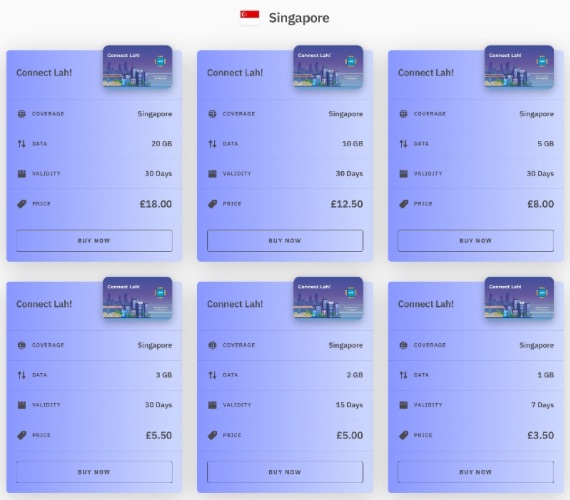
Airalo offers competitive pricing for data plans, especially when compared to pocket Wi-Fi rentals. The Connect Lah! plans operate on the Starthub 5G network.
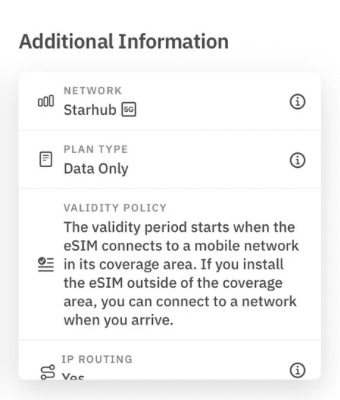
For my four-day trip, I opted for the 3 GB for 30 days plan. For only £5.60 / $7.00, it was the perfect choice. I knew I’dbe relying on my phone heavily for maps and ride-hailing, so 1 GB felt too risky. This plan gave me a comfortable data buffer and complete peace of mind, knowing I wouldn’t run out.
Savvy’s Tip: Ensure your phone is unlocked and compatible with eSIMs before making a purchase. While most newer smartphones support eSIM functionality, you can check Airalo’s compatibility list if you’re unsure.
How I Tested Airalo Connect Lah! eSIM
A review isn’t complete without some real-world testing. Here’s a step-by-step breakdown of my experience, from purchase to daily use.
Setup and installation
Setup Rating
I purchased and installed my eSIM a week before my flight. It was a super simple process, and within a few minutes, my eSIM was ready on my phone.
- The Purchase: I bought the 3 GB plan directly through the Airalo app. It’s a simple, secure process that took less than 60 seconds using Google Pay.
- The Installation: Right after I made the purchase, the eSIM appeared in the “My eSIMs” tab of the app. I opted for the direct installation method, which is the easiest option available. I simply clicked the “Install eSIM” button, and the app guided me through a few simple steps. In under two minutes, the eSIM was successfully installed on my iPhone.
- The Labelling: If you only have one eSIM, there’s no need to worry about labelling it. However, if you’re like me and often have several eSIMs, it’s crucial to label each one. This helps me easily distinguish my primary UK SIM from the other eSIMs I use. I also made sure that my primary SIM was selected for mobile data, and I turned off the “Airalo.Sing” eSIM for now.
Savvy’s Tip: Install the eSIM before travelling in a location with good Wi-Fi, and ensure your device is eSIM-compatible and unlocked. The app includes a compatibility checklist.
Network registration in Singapore
Network Registration Rating
After a long flight, the last thing you want is a problem with your mobile data. I needed it to work from the very first minute so I could connect with my friends and let them know we had landed.
This is where the beauty of the eSIM truly shone. As the plane was taxiing to the gate at Changi airport, I did the following:
- Switched off flight mode.
- Waited for the signal bar and R icon (R for roaming). I watched the network icon at the top of my screen. It searched for about 30 seconds. Don’t forget to enable Data Roaming. This is required for it to connect to the local mobile network (Starhub in this case).
- Switched on my mobile data (set it to Airalo eSIM before the flight).
- 4G icon with 2 arrows going both directions appeared. And I was connected.
As I was walking to the immigration, I messaged my friends. It was a flawless, stress-free start to my trip.
Savvy’s Tip: Always check if you can see these arrows going both directions. It means your phone is sending (arrow up) and also receiving (arrow down) data.
Reliability and User Experience
User Experience Rating
An eSIM is useless if the connection is slow or patchy. I had an excellent experience and Airalo connection was stable and consistently fast throughout my four days.
- Navigation & Transport: I used Google Maps constantly to navigate the city, from the lanes of Chinatown to the vast expanse of the Botanic Gardens. The connection was instant, with no lag. Most impressively, I had a full, usable signal whilst riding the MRT (metro) underground, which is not something you can always count on in other cities. Booking rides on the Grab app was a breeze; the app located me instantly and confirmed bookings in seconds.
- Social Media & Browsing: I was posting photos and videos to Instagram throughout the day. Uploads were quick, and I could browse and stream content without any frustrating buffering.
- Tethering: While resting at the hotel, I spent time playing games on my Nintendo Switch that I connected to the internet via my phone. There is no speed limit on tethering.
- No Dead Zones: From the top of Marina Bay to the walking trails on Sentosa Island, I did not encounter a single area where I lost connection. The Starhub network coverage was truly comprehensive.
Connectivity and Speed
Connectivity&Speed Rating
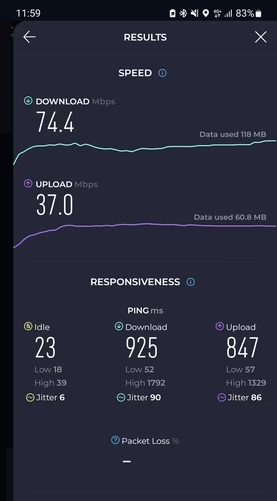
Singapore is recognised as one of the most well-connected countries in the world, and my experience with Airalo Connect Lah! eSIM there confirmed it. During my visit to the Marina Bay area, I tested the internet speed. The results indicated a download speed of 74.4 Mbps, while the upload speed was recorded at 37 Mbps.
Top-up
Top-up Rating
Airalo makes topping up easy; they inform you when your data drops below 25%, along with a link to add more.
In the Airalo app, go to My eSIMs → Connect Lah! eSIM → Top-Up to see all the plans. This flexibility enables you to start small and add data as needed, without incurring the cost of a larger plan upfront. Heavy users might prefer the 20 GB plan to avoid frequent top-ups.
The app shows each plan’s expiration date, making topping up easy and convenient.
Savvy’s tip: Adding a new plan does not extend the validity of your original plan. For instance, if your initial eSIM plan is valid for 30 days and you buy and activate a 7-day plan, the new plan will only last for 7 days. It is treated as a new eSIM plan.
Airalo Discount Codes
Who doesn’t love a discount? 😃 Use my Airalo code for $3 off or 15% off your first eSIM purchase. If you have an account, enjoy 10% off your next purchase. Here are your links:
These discounts help save a bit on your purchase. For instance, with the $3 off code, the 1 GB/7-day plan is only $1.50. A remarkable deal for the internet in Singapore. Remember, you can use only one code per account, but feel free to share it with friends who are trying Airalo for the first time.
Airalo App (Android & iOS)
Airalo offers a free mobile app for both Android and iOS, which I highly recommend. It makes it easy to purchase eSIMs, manage plans, and top up your account.
The app’s dashboard conveniently tracks data usage and displays the number of days remaining on your plan. You can also receive push notifications for alerts, such as low data, if you enable them.
Download the Airalo app from the Google Play Store or Apple App Store by clicking on the icons or the official Airalo links above. Create a free account, browse eSIM packages, and purchase eSIMs directly in the app. The app simplifies eSIM installation, allowing you to install the eSIM without a QR code.


Tips for Using eSIM Data in Singapore
Every country has its quirks when it comes to mobile data, and Singapore is no exception. Here are some quick tips for using your eSIM effectively:
- Download your eSIM before flying: Set up your eSIM at home while on a reliable, uninterrupted Wi-Fi connection. Download essential apps, like translators and maps, in advance.
- Monitor your data usage: Use the Airalo app to track your data usage. I typically used between 500 MB and 700 MB daily. If you plan to stream or video call frequently, consider opting for a larger data plan.
- Have a backup for remote areas: While cities generally have good signal coverage, remote areas may experience issues. Download offline maps from Google Maps and keep your hotel Wi-Fi information handy.
- Keep your primary SIM for calls and SMS: The Airalo Connect Lah! eSIM is data-only, so make sure to keep your regular SIM active for SMS and calls. Just remember to set your data connection to the eSIM.
- Use free Wi-Fi when convenient: Singapore offers reliable free Wi-Fi in restaurants, cafés and hotels. Take advantage of it to save your mobile data for when it is truly needed. To protect yourself, consider using a VPN.
Following these tips will help ensure a smooth connectivity experience while you are in Singapore!
Maximise Your Trip (Now Your Internet is Sorted!)
With a reliable internet connection in your pocket, you have the freedom to be spontaneous. If you are wondering what to see in Singapore, check this article about places in Singapore. If you prefer having a tour guide, explore available tours on GetYourGuide or Viator.
Pros & Cons
No product is perfect. Here’s my honest breakdown of the good and the not-so-good.
| Pros | Cons |
|---|---|
| Incredibly easy to set up: The process is beginner-friendly and takes just a few minutes. | No unlimited data option: Heavy data users may need to buy larger plans or top up. |
| Instant connectivity on arrival: Land and get online immediately. | Data-only plans: No voice calls or SMS; use apps for communication. |
| Reliable network: Great coverage and fast 4G+ speeds across the entire island. | eSIM-compatible phone required: Works for most modern devices, but not all older or carrier-locked ones. |
| Affordable pricing: Starting at $4.50, cheaper per GB than pocket WiFi or roaming. | |
| Flexible plans: Options for 7, 15, or 30 days, with easy data top-ups. | |
| Manage everything in an app: Easily track your data usage and top up if needed directly from the Airalo app. |
Conclusion – Is Airalo Connect Lah! Worth It for Singapore?
Without a doubt, yes.
The Airalo Connect Lah! eSIM is an outstanding solution for staying connected in Singapore. It strikes the perfect balance between affordability, convenience, and performance. For the vast majority of travellers, from first-time eSIM users to seasoned digital nomads, it’s simply the smartest way to get mobile data for your trip.
The freedom of landing at Changi and being instantly connected is a travel luxury I’ll never take for granted again. Forget the roaming bill anxiety and the hassle of finding a SIM card shop. Give Airalo a try on your next trip to Singapore – you won’t be disappointed.
Frequently Asked Questions (FAQ)
What’s the best way to get mobile data in Singapore: eSIM, physical tourist SIM, or pocket WiFi?
For most travellers with a modern smartphone, an eSIM is the best option. It offers the convenience (set up before you fly), excellent pricing, and top-tier performance without the need to carry an extra device (pocket WiFi) or swap out your physical SIM card.
Should I get an eSIM before I travel or buy a physical SIM card at Changi Airport?
Get an eSIM before you travel. My experience confirms this is the best way. The biggest advantage is being connected the moment you land. I was able to message my family and book my Grab ride before even leaving the plane, all while avoiding the long queues at the airport’s SIM card kiosks.
Is the free public WiFi reliable enough to get by without a data plan?
While Singapore’s public WiFi is extensive and useful inside hotels, restaurants, malls or at MRT stations, it’s not reliable enough to depend on entirely. Connections can be spotty, require frequent logins, and won’t be available when you’re walking down the street trying to navigate. A dedicated data plan is essential for a stress-free trip.
How much data do I actually need for a one-week trip to Singapore?
Based on my own usage of roughly 500 MB per day, I would recommend either the 3 GB or 5 GB plan for a one-week trip. This will provide a very comfortable buffer, allowing you to use maps, social media, and booking apps freely without any ‘data anxiety’.
Do I need a local Singaporean phone number, or is a data-only eSIM fine?
A data-only eSIM is fine for over 95% of travellers. I remember only one occasion when I needed to make several calls while I was in Abu Dhabi. The rest of the time, all my communication was done through apps like Signal. I know other people use WhatsApp or Telegram. Unless you have a specific need to make frequent traditional calls to local landlines, you will not miss having a local number.
I’m also visiting Malaysia/Thailand/Indonesia. Is there a good regional eSIM for Southeast Asia?
Yes! Airalo offers a regional Asialink eSIM that covers multiple countries in Southeast Asia, including Singapore, Malaysia, Thailand, and Indonesia. If you’re on a multi-country tour, this is an incredibly convenient and cost-effective option. You buy one plan and stay connected as you cross borders.